
Source code: Ignore Touchpad
When I program or write stories on my laptop while traveling by train, it often happens that a sudden jolt makes my thumb brush against the touchpad. The result: the text I’m typing suddenly appears in a completely different part of the document. It’s infuriatingly annoying. At some point, I snapped and decided I’d had enough of this nonsense.
So I ended up creating a small console utility for the „Haiku” operating system whose job is to filter out accidental touchpad input whenever a laptop has more than one pointing device:

The algorithm is very simple: when asked to ignore a certain input device, my program sends this request to the operating system via BInputDevice→Stop(). When the user wants to re-enable the device, the utility calls BInputDevice→Start():

All the core functionality takes about twenty lines of code — not counting blank ones. The other two hundred eighty lines are just boilerplate: input validation, error handling, user messages, and similar fluff.
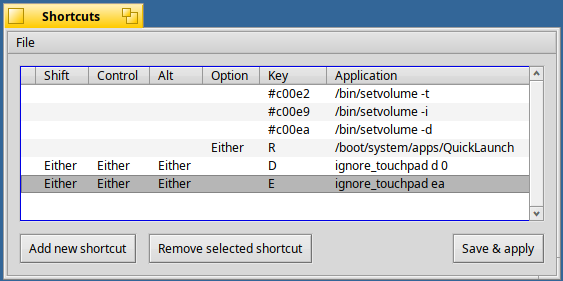
Currently, the utility is designed for use from the command line and supports two modes — interactive and non-interactive. The non-interactive mode is particularly convenient for assigning to system Shortcuts. When you plug in a mouse after the system has booted, the touchpad is usually device #0, so you can disable it instantly with a single shortcut chord. It’s also wise to have another shortcut that re-enables all previously disabled devices: the utility isn’t resident, and it doesn’t check how many pointing devices remain active. So if you disable the touchpad and then unplug the mouse, the touchpad won’t unlock itself — leaving you with no way to move the cursor at all.
I’m also working on a GUI — a replicant that will load together with the system and stay resident in memory inside the Deskbar Shelf (Haiku’s equivalent of the Windows taskbar notification area). This will allow users to enable or disable devices without touching the command line. The GUI will be based on the program „AutoRaise” by mmu_man. But GUI development takes time — and since I personally don’t need this feature, there are more interesting things to work on. 🙂
Example of the utility in action:

Source code: Ignore Touchpad