Source code: Esperanto filter
The Esperanto alphabet lacks several letters found in the Latin one, but it includes six characters with diacritics: five with a circumflex (ĵ, ĥ, ŝ, ĉ, and ĝ) and one with a breve (ŭ). Naturally, letters with diacritics differ in both pronunciation and meaning from their plain counterparts. For example, «j» sounds like “i” in „view”, but «ĵ» sounds like “j” in „joy”. Likewise, if «komenciĝis» means “began” (by itself), then «komencigis», without the circumflex over g, means “was started by someone”.
Of course, Haiku supports Esperanto, and there is even a dedicated system keyboard layout for Esperanto that can be added to the input language switcher:
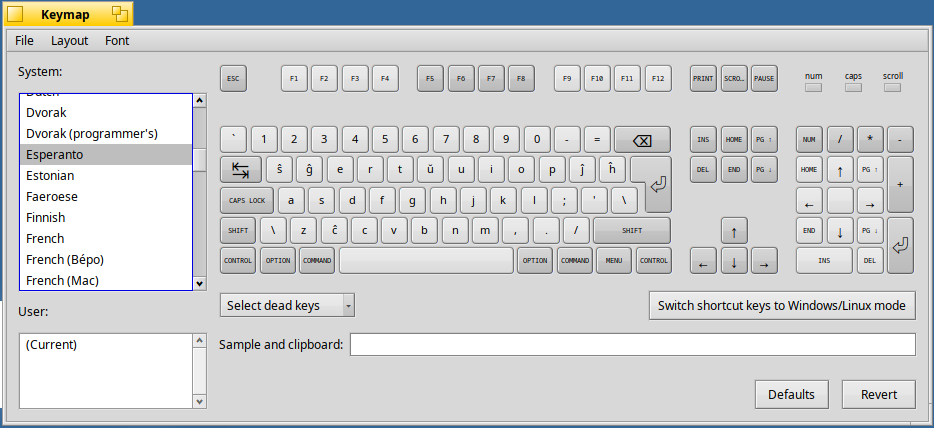
But is it really worth adding yet another layout just for six letters — when I already have three (Russian, English, and Hebrew)? Especially since the extra characters are placed in the most unpredictable places of the keyboard and aren’t printed on the physical keys? Obviously not. On Windows this problem was solved long ago — there’s a free program called „Tajpi”, which allows you to add diacritical marks to letters typed in the English layout simply by typing the caret (“^”) symbol afterward. So why not create a similar utility for Haiku?
That’s how the input server add-on for easy Esperanto typing was born.
An input server add-on is a filter through which all messages from input devices pass. Keyboard keystrokes, mouse movements, joystick tilts, and stylus pressure are all transmitted to the operating system through the input server as messages that enter a common FIFO buffer. The add-on has access to these messages and can filter them, modify them, insert new ones into the buffer, or remove existing ones.
I first intercepted and recorded the messages the keyboard driver sends when typing characters with diacritics, as well as the message corresponding to the Backspace key. Then it was just a matter of designing a simple finite-state machine: if a letter which’s capable of taking a diacritic arrives, the add-on switches into “waiting” mode; if the next character is “^”, the add-on adds two messages to the FIFO buffer — one for Backspace and one for the corresponding letter with a diacritic — and enters a secondary waiting mode. If another “^” arrives, it again sends Backspace and then the original plain letter message.
Here’s how it looks in use:
Later I decided it would be nice to add a configuration panel:
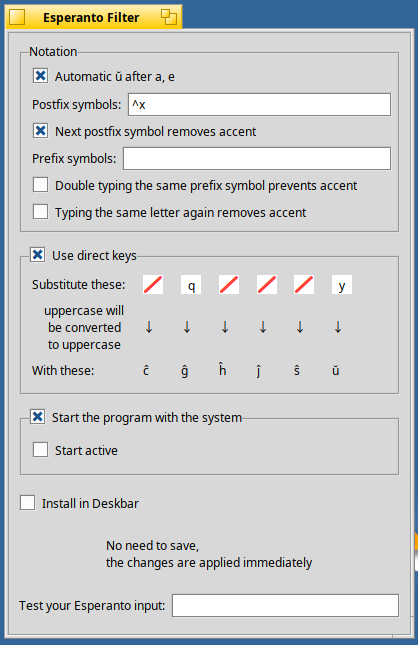
That, of course, required some changes to the finite-state machine — but even after the added complexity, it remained fairly simple.
The biggest challenge in the settings window was implementing the area for direct keys — letters that are automatically replaced with their diacritic equivalents. It uses both a text input field and a mask that allows only one letter to be entered, automatically converting input to lowercase. There’s logic to enable or disable fields depending on checkboxes, a diagonal red slash if a particular letter isn’t used, and highlighting of another field if the user mistakenly tries to assign the same base letter to two different Esperanto letters. I’d say three-quarters of the entire code deals with those input fields alone.
Исходный код: Esperanto filter